
Create a clock widget
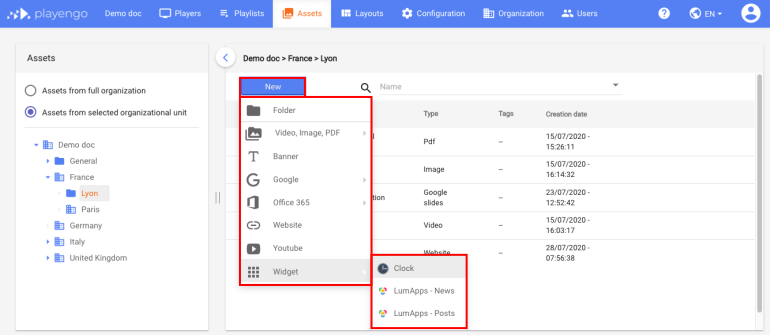
1. Open the Assets tab and select the required folder in the left panel.
2. Click New and select Widget, then Clock in the menu.
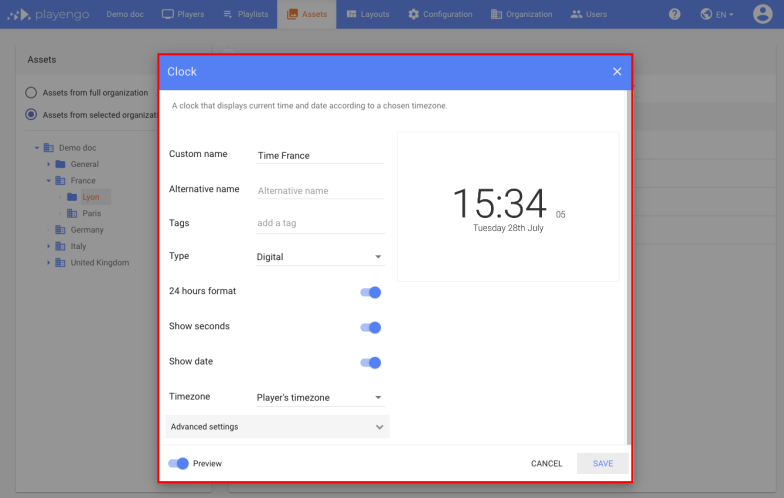
3. In the Clock dialog:
- Give your clock a name.
- Add tags, if required.
- Select whether the clock is digital or analog.
- Define if you want a 24 hour clock.
- Define whether to show seconds.
- Define whether to show the date.
- Choose the timezone of your clock. The default is the timezone of the player.
4. Click Save.
The clock widget is now displayed on your players.
Advanced settings
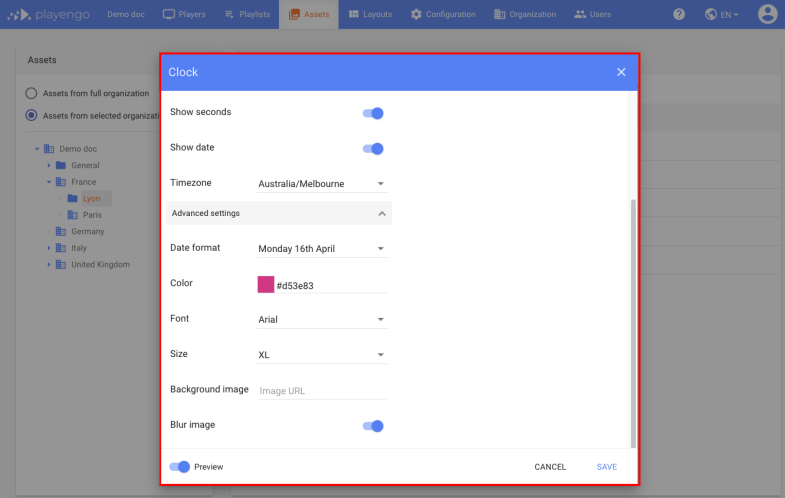
1. In the Clock dialog, open the advanced settings.
2. You can:
- choose the date format
- select a color, font and size for your clock
- add a background image: enter the URL of a published image
- define whether to blur the image – this may improve the contrast if you added a background image
If you selected Preview in the Clock dialog, the preview shows the advanced settings.
3. Click Save.
Comments
0 comments
Please sign in to leave a comment.