
The Twitter feed widget is a basic widget provided by Twitter. It broadcasts the latest five (or more) tweets of a selected public Twitter feed, regardless of how long ago they were created.
Learn more about displaying the results of Twitter searches: Assets: Twitter search widget.
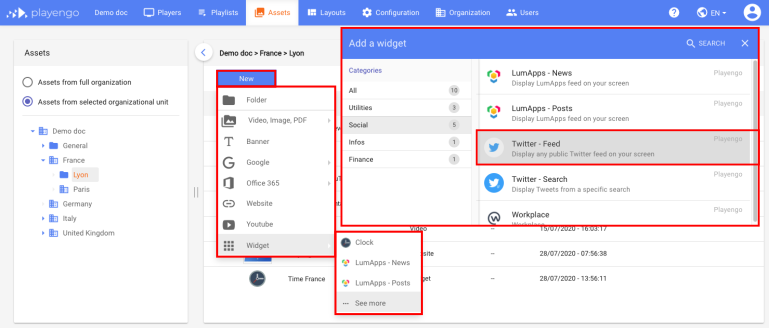
1. Open the Assets tab and select the required folder in the left panel.
2. Click New and select Widget > See more in the menu.
3. In the Add a widget dialog, scroll down, select Social or do a search. Select the Twitter – feed widget.
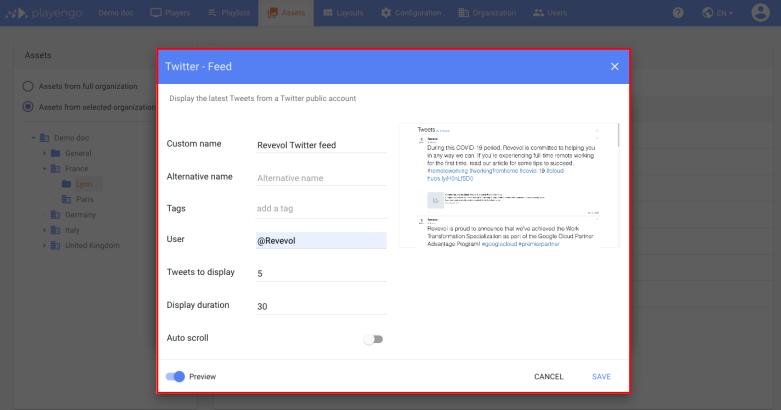
4. In the Twitter - Feed dialog:
- give your Twitter feed a name
- in the User field add the required Twitter handle
You can also:
- add a tag
- choose how many Tweets to display (these will be the latest tweets on the Twitter feed)
- define how long the Tweet feed asset is displayed
- select Auto scroll for a scrolling view of the Tweets
5. Click Save.
Comments
0 comments
Please sign in to leave a comment.